Using Proxy ARP on pfSense to Bridge Remote Networks Across an IPSec Tunnel
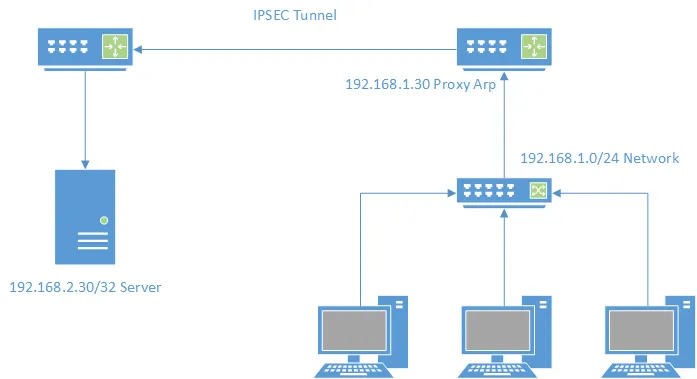
What is Proxy ARP?
Proxy ARP is a technique by which a proxy server on a given network answers the Address Resolution Protocol (ARP) queries for an IP address that is not on that network.
Proxy ARP allows a firewall to answer requests for IP addresses that don’t belong to it physically but are routed through it. I commonly use this to firewall off specific networks or allow access to resources across VPN tunnels—like the IPSec tunnel in this example.
IPSec Tunnel
First, establish and verify the tunnel between the two networks. Ensuring identical configurations on both sides is key. For details, refer to the pfSense IPSec documentation.

Local Network
In this scenario, the LAN is 192.168.1.0/24. We will add a new Proxy ARP Virtual IP on the pfSense.
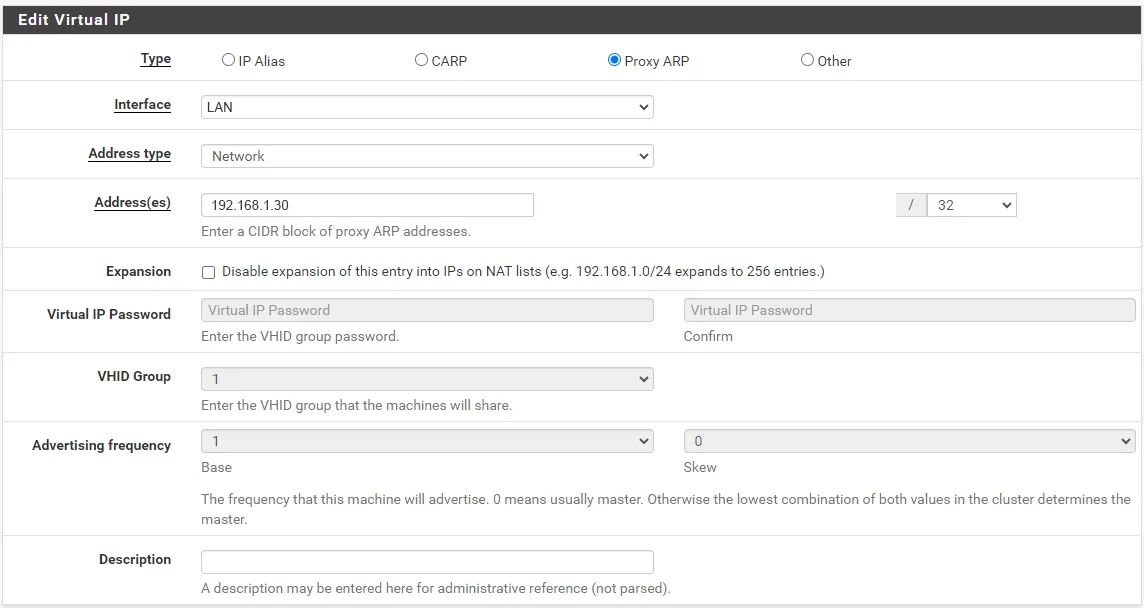
Since we are defining a single IP, use a /32 bitmask. This adds an entry to the firewall’s ARP table. While the firewall won’t reply to ICMP pings for this address, it will accept and route traffic destined for it.
Forwarding to the Remote Network
The goal is to forward traffic from a LAN address (192.168.1.30) to a server on the remote network (192.168.2.30) across the tunnel.
We achieve this with a Port Forwarding rule.
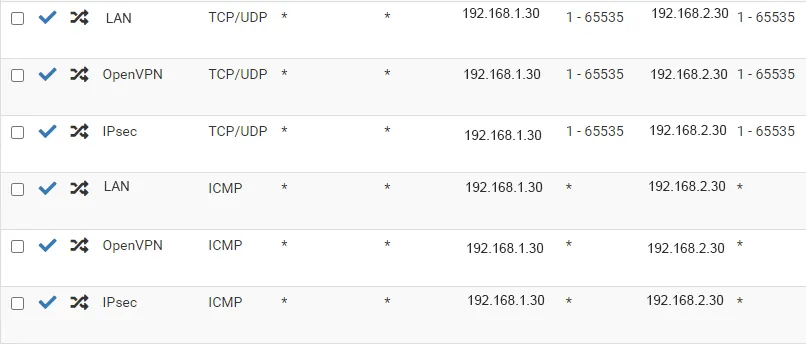
Configure the rule to forward traffic (TCP, UDP, ICMP, or specific ports) from the local Proxy ARP address to the remote server’s IP. Once active, LAN users can access the remote server using the local address.
Surveyor: A Field-Tested Network Discovery Tool for MSPs
From Raspberry Pi prototype to Wails desktop app: how Surveyor replaces manual nmap commands with stealth scanning and RFC 1918 auto-discovery.
Designing Fully Redundant Infrastructure: Physical and Logical Layers Explained
How redundant compute, SAN mirroring, load balancers with CARP, and synchronous database clustering eliminate both hardware failures and maintenance windows.
Authenticating pfSense OpenVPN Against IBM i LDAP
Use the IBM i Tivoli LDAP server as a single source of truth for VPN and service authentication. Here is the full setup, including a Node.js script to sync user profiles.